@ |
Please ensure your system is connected to the internet before continuing. |
Select the Tools sub menu.
|

Select the System Tools option.
|

Select the Check For CFM Updates option in the list displayed. |
Select Check For Updates.
|

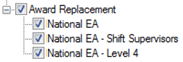
Tick the required awards to update from the options listed.
|
You must read and agree to the terms and conditions of the data update by ticking the I Agree to the above conditions option and entering the name of the person who is authorising the update.
|

Select the Apply Update options.
|

A confirmation will be displayed when the update is complete, select OK to finish the update.
|

Each updated award must now be reviewed by entering the reviewer's name and position on the General, Pay rates and Penalty Rates tabs/sections.
|
