Select the Payroll Reports sub menu.
|

Select the Email Payslips option.
|

Select the weekending date for the payroll run from the Weekending Date drop down list.
|

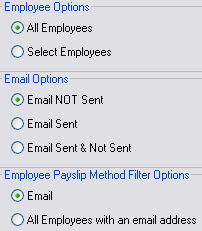
Set the appropriate filters to determine what employees to list and then tick the employees to email.
|
Select the Send Emails button when all required employees are selected.
|

Progress of the email send routine will be displayed and a confirmation window will be displayed when all emails are sent. |